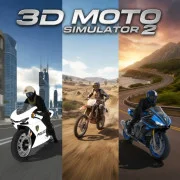
3D Moto Simulator 2
Pick a bike, open a map, and ride wherever the road—or the dirt—takes you.
3D Moto Simulator 2 · Press Esc to exit fullscreen
ABOUT THE GAME
Open maps, a few bikes, no checklist
3D Moto Simulator 2 is a browser motorcycle sandbox. There is no career ladder and no timer yelling at you—just a handful of bikes, a few large maps, and whatever pace you set for the session.
You can stick to paved streets, cut onto rough tracks, or hunt for ramps and open dirt. The police bike even has working lights if you want the full siren bit. Swap cameras when the third-person view feels too safe; first-person makes jumps and near-misses land harder.
It is an older WebGL title (mid-2010s lineage), so expect arcade physics more than a hardcore sim. That is the point: load the tab, grab a bike, and mess around.
WHAT YOU DO
Ride, switch, explore
- 1
Three bikes on tap
Keys 1–3 swap machines mid-run. Handling changes enough that a line that works on one bike can get sloppy on another.
- 2
Maps with room to wander
City stretches, off-road cuts, and emptier wasteland space sit side by side. If a road feels crowded, peel off and find a quieter loop.
- 3
Speed tools, not a race HUD
Nitro is for long straights. Handbrake covers tight turns and the odd stunt. There is no finish line—you decide when a run is done.
SESSION FLOW
Your own route, your own goals
Progress here is informal: learn a map’s ramps, get comfortable with one bike’s throttle, then try a harder camera or a messier patch of terrain. Flipping is normal—reset the bike and keep going.
If you like score-chasing racers, this will feel looser. If you like sandbox driving tabs you can idle in for ten minutes, it fits that mood.
CONTROLS
Keyboard (desktop embed)
RIDING TIPS
Keep it upright, then get brave
- Brake before the fancy line — Wide maps invite full throttle. Ease into corners first; nitro after you know the exit.
- Handbrake is a tool, not a panic button — A short tap rotates the bike for tight turns. Holding it forever usually means a slide into traffic or a wall.
- Try another camera after a crash streak — If third-person keeps lying about distance, flip to first-person for a lap—jumps and gaps read differently.
- Leave the pavement — Some of the better ramps sit off the main roads. If a session feels flat, cut dirt for a minute.
FAQ
Is there a story or mission list?+
No. This build is free-roam: pick a bike, pick a map vibe, and ride. Goals are whatever you invent for the session.
Why does the bike flip so easily?+
Physics lean arcade-chaotic. Slow down before big jumps, and use G if you land on your head.
Can I play it without installing anything?+
Yes. The game runs in the embed on this page through your browser.
SHARE
Riding 3D Moto Simulator 2—switching bikes, messing with camera angles, and finding ramps on big free-roam maps.
https://escaperoad-3.com/games/3d-moto-simulator-2
3D Moto Simulator 2