Grand Action Simulator: New York
NYC streets, cars, and chaos—click Play and take the city at your pace.
Grand Action Simulator: New York · Press Esc to exit fullscreen
ABOUT THE GAME
A New York crime sandbox you can open in a tab
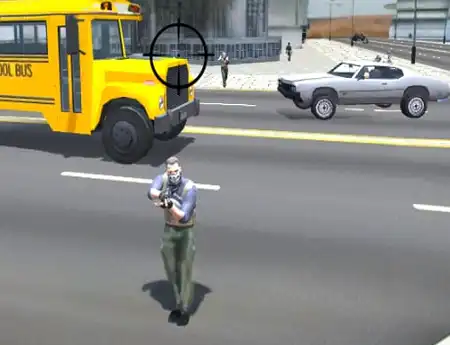
Grand Action Simulator: New York (often listed as New York Car Gang) is a third-person open-world action game from HGames-ArtWorks. You drop into a stylized big-city map, pick up cash however you like, and spend it on weapons, armor, and rides while optional missions pull you toward tougher districts and rival crews.
Unlike a single linear campaign, the session is built around freedom: walk the blocks, jack a parked car, chase a marker, or ignore objectives and just cruise. The browser embed keeps that loop instant—no launcher and no install from this page—so you can treat it as a short street-chaos break or a longer free-roam grind.
Expect a simplified metro feel rather than a photoreal NYC tourist map: roads, bridges, dense blocks, traffic, and pedestrians give you room to experiment with driving, combat, and shopping between jobs.
WHAT YOU DO
Explore, drive, fight, and gear up
- 1
Open-city roaming
Move on foot or by vehicle across connected districts. Markers kick off jobs when you want structure; free roam stays available if you prefer spontaneous routes and stunts.
- 2
Vehicle playground
Cars (and other rides when available) are scattered around the map. Learn handling on long avenues, cut through alleys, or swing by a garage when you want a different set of wheels.
- 3
Street combat
Melee and firearms both matter. Swap weapons mid-fight, toss grenades when crowds stack up, and decide whether a loud shootout or a quick getaway fits the moment.
- 4
Earn and spend
Cash from jobs and street play feeds nearby shops—armor, guns, and other loadout pieces that make the next mission less punishing.
- 5
Optional mission chain
Approach objective markers for confrontation, retrieval, or travel tasks. Skipping them does not lock the map; they are there when you want direction.
WORLD & CONTENT
Districts, shops, and repeatable chaos
The map mixes residential stretches, busier commercial corridors, and denser downtown-style streets linked by roads and bridges. Pedestrians and traffic keep the city feeling busy even when you ignore the next marker, so improvising a chase or a quiet cruise both feel natural.
Between fights you can hit shops and garages to refresh gear and vehicles, then push into tougher encounters as your loadout improves. There is no fixed “one true ending” pressure—each visit can focus on driving practice, mission clears, or pure free-roam experimentation. Browser performance and save behavior depend on the host and your device, so finish important goals in one sitting if progress does not stick.
CONTROLS
Keyboard & mouse (desktop recommended)
SESSION TIPS
Smoother city runs
- Use a desktop browser — This Unity open-world embed is aimed at desktop. Chrome or Edge with hardware acceleration on usually feels more stable than phones.
- Wait through the first load — City assets are heavy. Let the world become responsive before mashing keys or refreshing.
- Click into the frame — If WASD does nothing, click the player so keyboard and mouse focus sit on the game.
- Gear before hard markers — Spend early cash on armor and a reliable weapon—shops and better rides make later street fights far less random.
- Have an escape route — After loud combat, jump in a nearby vehicle and leave the block instead of reloading into the same crowd.
- Close heavy tabs — WebGL cities compete for GPU memory. Free resources if the frame rate drops.
FAQ
What is Grand Action Simulator: New York?+
It is a free-to-play open-world crime sandbox by HGames-ArtWorks: explore a New York–style city, drive stolen or owned vehicles, take optional missions, and buy weapons and armor. This page embeds the browser version for instant play.
Do I need to download anything?+
Not from this site. The session runs in the embed. The first load may still stream assets into the browser—give it time before refreshing.
Is this the same as Grand Theft Auto?+
No. It is a separate third-party title with a similar open-world crime vibe (city roaming, cars, combat, missions). Grand Theft Auto and related marks belong to their rights holders.
Can I play on mobile?+
Some hosts try touch support, but this build is widely treated as desktop-first. Keyboard and mouse are the most reliable way to drive and fight.
Will my progress save?+
It depends on the embed host and your browser storage. If saves do not stick, treat sessions as short runs and complete key missions or shopping in one visit when you can.
Why is the game slow or stuck on a black screen?+
Enable hardware acceleration, use an up-to-date desktop browser, close other heavy tabs, and wait through the initial asset load before refreshing.
SHARE
Trying an open-world New York crime sandbox in the browser—drive, fight, and free-roam with no install.
https://escaperoad-3.com/games/grand-action-simulator-new-york
Grand Action Simulator: New York