Draw and Fight: War Machines
Sketch the chassis, bring the chaos—then redraw what failed.
Draw and Fight: War Machines · Press Esc to exit fullscreen






ABOUT THE GAME
Art supplies meet armor plates
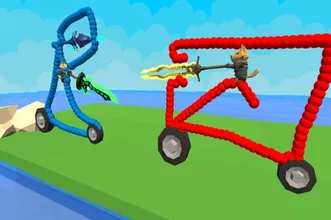
Draw and Fight: War Machines is a hybrid experience: you sketch and assemble a fighting vehicle, then send it into short battles where geometry and gear choices actually matter. The hook is ownership—when you lose, you are not just “bad at aiming”; you might be handing yourself a top-heavy silhouette or a weapon layout that hates your play style.
Expect a loop of sketch, test, revise. A stable base, sensible wheel placement, and clear weapon arcs tend to outperform flashy scribbles—though a wild idea that somehow works is half the fun.
It runs in a normal web session, so it is easy to try between classes or on a break: one round to experiment, one round to try a cleaner blueprint.
HOW IT PLAYS
Design, deploy, debrief
- 1
Drawing is loadout
Shapes and attachments translate into how your machine moves, absorbs hits, and lines up shots. Think structure first, stickers second.
- 2
Battles reward readable builds
If your rig tumbles or cannot bring guns to bear, return to the drafting step. Small edits often fix big headaches.
- 3
Experimentation is the progression system
The best teacher is a failed round with a clear cause: too tall, too narrow, too fragile at the joints.
WHAT YOU LEARN
From doodle to dependable frame
Skill here is split between creativity and discipline: wild concepts are welcome, but stable platforms and thoughtful weapon placement win more rematches.
Keep a few blueprints in mind—compact brawler, ranged skirmisher, balanced all-rounder—and tweak details after each loss instead of redrawing from scratch every time.
CONTROLS
Mouse, touch & keyboard
DESIGN TIPS
Build boring, then spice
- Start with a wide footprint — Tall narrow stacks look cool until the first bump. Give yourself stability, then add flair.
- Keep weapons in arc — If barrels point at your own chassis, the lobby will not pity you.
- Iterate in small steps — Change one weakness per rematch so you know what actually helped.
- Mobile vs desktop — Touch can be faster for sketching; keyboard can be precise for movement—use what fits your device.
FAQ
Can I play on phone and PC?+
Most builds support both: touch for drawing and either on-screen or keyboard controls in combat. Performance depends on your browser and device.
Do I need to install anything?+
No. It loads inside your browser through the embed on this page.
My vehicle keeps tipping or jamming—why?+
Usually center of mass, wheel placement, or weapon clearance. Simplify the silhouette, widen the base, and retest.
SHARE
Playing Draw and Fight: War Machines—doodling tanks and finding out which silhouette actually wins.
https://escaperoad-3.com/games/draw-and-fight-war-machines
Draw and Fight: War Machines